
This tutorial outlines the process for managing databases within Virtualmin. How to manage your database Managing databases is essential for website and application management. Virtualmin streamlines the database management process. Here’s how to do it: Select domain From the top-left corner dropdown box, choose the domain which database you wish to manage. Edit databases Click on Edit Databases to proceed with database management. Database management To manage a specific database, click the Manage link next to the database name.
This tutorial outlines the process for managing databases within Virtualmin.
How to manage your database#
Managing databases is essential for website and application management. Virtualmin streamlines the database management process. Here’s how to do it:
Select domain
From the top-left corner dropdown box, choose the domain which database you wish to manage.Edit databases
Click on Edit Databases to proceed with database management.Database management
To manage a specific database, click the Manage link next to the database name.
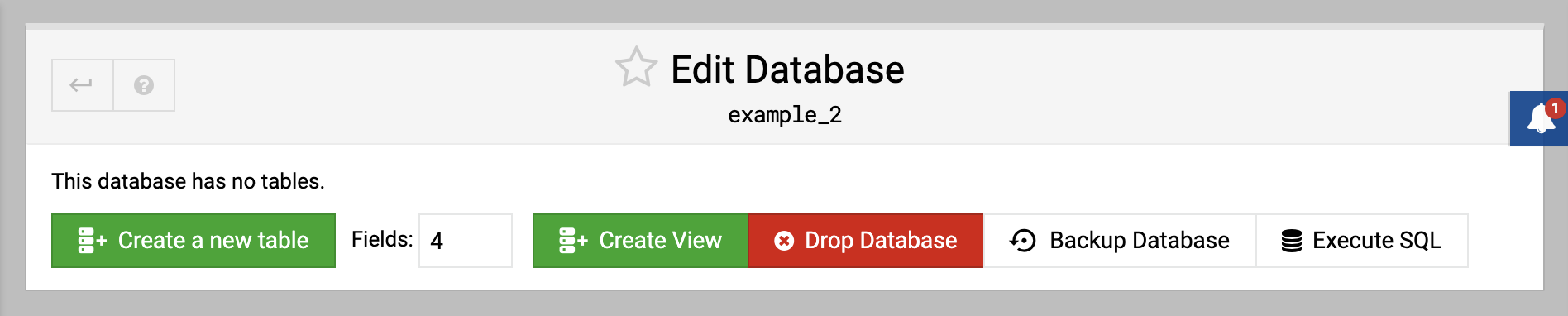
Opened page will provide the following database operations:
Create a new table
Begin defining a new table by specifying the number of fields and clicking Create a new table.Create view
Construct a new view for running specific queries by clicking Create View.Drop database
Remove the entire database from the system by selecting Drop Database.Backup database
Safeguard your data by creating a backup with the Backup Database option.Execute SQL
Run custom SQL queries on your database by selecting Execute SQL.
Follow these simple steps to effectively manage databases within Virtualmin.
Source: https://www.virtualmin.com/docs/server-components/managing-databases/
