
This guide provides a straightforward approach to creating a new MySQL/MariaDB or PostgreSQL database in Virtualmin. How to create a new database Creating a database is a common requirement for website development and application management. Virtualmin provides an easy way to set up a new MySQL/MariaDB or PostgreSQL database. Here’s how to do it: Select the domain After logging into Virtualmin, choose the domain for which you want to create the database. Do this by selecting the domain name from the drop-down box in the top-left corner of the left menu.
This guide provides a straightforward approach to creating a new MySQL/MariaDB or PostgreSQL database in Virtualmin.
How to create a new database#
Creating a database is a common requirement for website development and application management. Virtualmin provides an easy way to set up a new MySQL/MariaDB or PostgreSQL database. Here’s how to do it:
Select the domain
After logging into Virtualmin, choose the domain for which you want to create the database. Do this by selecting the domain name from the drop-down box in the top-left corner of the left menu.Navigate to database management
Click on Edit Databases, which is where you manage all database-related settings for your domain.Create a new database
Click on Create a new database. This will open a form to set up your new database: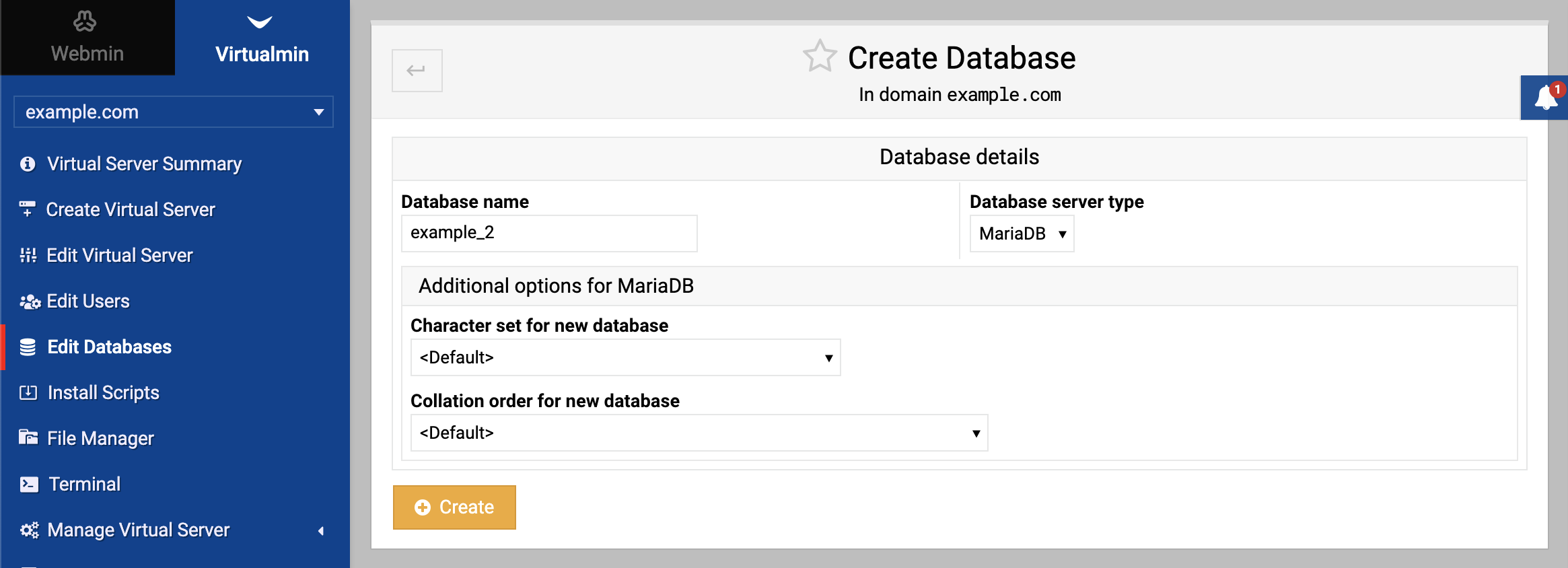
Configure database settings
- Database name: Choose a name for your database and enter it in the Database name field. This name should be unique and descriptive.
- Database server type: In the Database server type field, select either MySQL/MariaDB or PostgreSQL. If you’re unsure which to choose, MySQL/MariaDB is a popular choice for its ease of use and broad compatibility.
Create the database
Click Create. Virtualmin will process your input and establish the new database.
Once successfully created, this new database will be associated with your selected virtual server.
Source: https://www.virtualmin.com/docs/server-components/how-to-create-database/
