
Virtualmin allows the selection of different PHP versions and execution modes for each domain. The recommended execution mode is FPM, but CGI/FCGId is also available, enabling per-directory PHP version settings. Installing additional PHP versions On RHEL, Alma, Rocky, Oracle, CentOS Stream and Fedora Linux Install Remi repository . /etc/os-release && repo_dir=$([ "$ID" = "fedora" ] && echo "fedora" || echo "enterprise") && sudo dnf -y install "https://rpms.remirepo.net/$repo_dir/remi-release-$(rpm -E %$ID).rpm" && sudo dnf clean all Install PHP packages sudo dnf install php81-php-{cli,fpm,pdo,gd,mbstring,mysqlnd,opcache,curl,xml,zip} Replace php81 with the desired PHP version, e.g., php83. Check available PHP versions and extensions in the Remi Repository or use dnf search php. On Debian Enable Sury/PHP repository sudo apt-get -y install apt-transport-https lsb-release ca-certificates curl && sudo curl -sSL -o /usr/share/keyrings/debsuryorg-archive-keyring.gpg https://packages.sury.org/php/apt.gpg && sudo sh -c 'echo "deb [signed-by=/usr/share/keyrings/debsuryorg-archive-keyring.gpg] https://packages.sury.org/php/ $(lsb_release -sc) main" > /etc/apt/sources.list.d/sury-debian-php-$(lsb_release -sc).list' && sudo apt-get update Install PHP packages sudo apt-get install php8.1-{cgi,cli,fpm,pdo,gd,mbstring,mysqlnd,opcache,curl,xml,zip} Replace php8.1 with the desired version, e.g., php8.3. Check available PHP versions and extensions on the SURY website or via apt-cache search --names-only ^php. On Ubuntu Enable Ondrej/PHP repository sudo env LC_ALL=C.UTF-8 add-apt-repository -y ppa:ondrej/php && sudo apt-get update Install PHP packages sudo apt-get install php8.1-{cgi,cli,fpm,pdo,gd,mbstring,mysqlnd,opcache,curl,xml,zip} Replace php8.1 with the specific version, e.g., php8.3. Check available PHP versions and extensions on the Ondrej PPA website or via apt-cache search --names-only ^php. Installing additional PHP extensions In order to add additional PHP extensions, for all PHP versions installed on the system, use the following command:
Virtualmin allows the selection of different PHP versions and execution modes for each domain. The recommended execution mode is FPM, but CGI/FCGId is also available, enabling per-directory PHP version settings.
Installing additional PHP versions#
On RHEL, Alma, Rocky, Oracle, CentOS Stream and Fedora Linux#
- Install Remi repository
. /etc/os-release && repo_dir=$([ "$ID" = "fedora" ] && echo "fedora" || echo "enterprise") && sudo dnf -y install "https://rpms.remirepo.net/$repo_dir/remi-release-$(rpm -E %$ID).rpm" && sudo dnf clean all - Install PHP packages
sudo dnf install php81-php-{cli,fpm,pdo,gd,mbstring,mysqlnd,opcache,curl,xml,zip}- Replace
php81with the desired PHP version, e.g.,php83. - Check available PHP versions and extensions in the Remi Repository or use
dnf search php.
- Replace
On Debian#
- Enable Sury/PHP repository
sudo apt-get -y install apt-transport-https lsb-release ca-certificates curl && sudo curl -sSL -o /usr/share/keyrings/debsuryorg-archive-keyring.gpg https://packages.sury.org/php/apt.gpg && sudo sh -c 'echo "deb [signed-by=/usr/share/keyrings/debsuryorg-archive-keyring.gpg] https://packages.sury.org/php/ $(lsb_release -sc) main" > /etc/apt/sources.list.d/sury-debian-php-$(lsb_release -sc).list' && sudo apt-get update - Install PHP packages
sudo apt-get install php8.1-{cgi,cli,fpm,pdo,gd,mbstring,mysqlnd,opcache,curl,xml,zip}- Replace
php8.1with the desired version, e.g.,php8.3. - Check available PHP versions and extensions on the SURY website or via
apt-cache search --names-only ^php.
- Replace
On Ubuntu#
- Enable Ondrej/PHP repository
sudo env LC_ALL=C.UTF-8 add-apt-repository -y ppa:ondrej/php && sudo apt-get update - Install PHP packages
sudo apt-get install php8.1-{cgi,cli,fpm,pdo,gd,mbstring,mysqlnd,opcache,curl,xml,zip}- Replace
php8.1with the specific version, e.g.,php8.3. - Check available PHP versions and extensions on the Ondrej PPA website or via
apt-cache search --names-only ^php.
- Replace
Installing additional PHP extensions#
In order to add additional PHP extensions, for all PHP versions installed on the system, use the following command:
Debian and derivatives#
for php in $(ls /etc/php); do sudo apt-get install -y "php$php-"{curl,intl}; done
EL systems#
for php in $(scl list-collections 2>/dev/null | grep 'php' | sed 's/$/-php/') php; do for ext in curl intl; do sudo dnf -y install "${php}-${ext}"; done; done
A command above will install the curl and intl extensions for all PHP versions installed on the system. You can replace the names of the extensions with the ones you need to have installed.
Configuring default PHP version#
After installing another PHP version:
Verify in Virtualmin: Log in, go to System Settings ⇾ Re-Check Configuration. Among other information, you should see available PHP versions and execution modes.
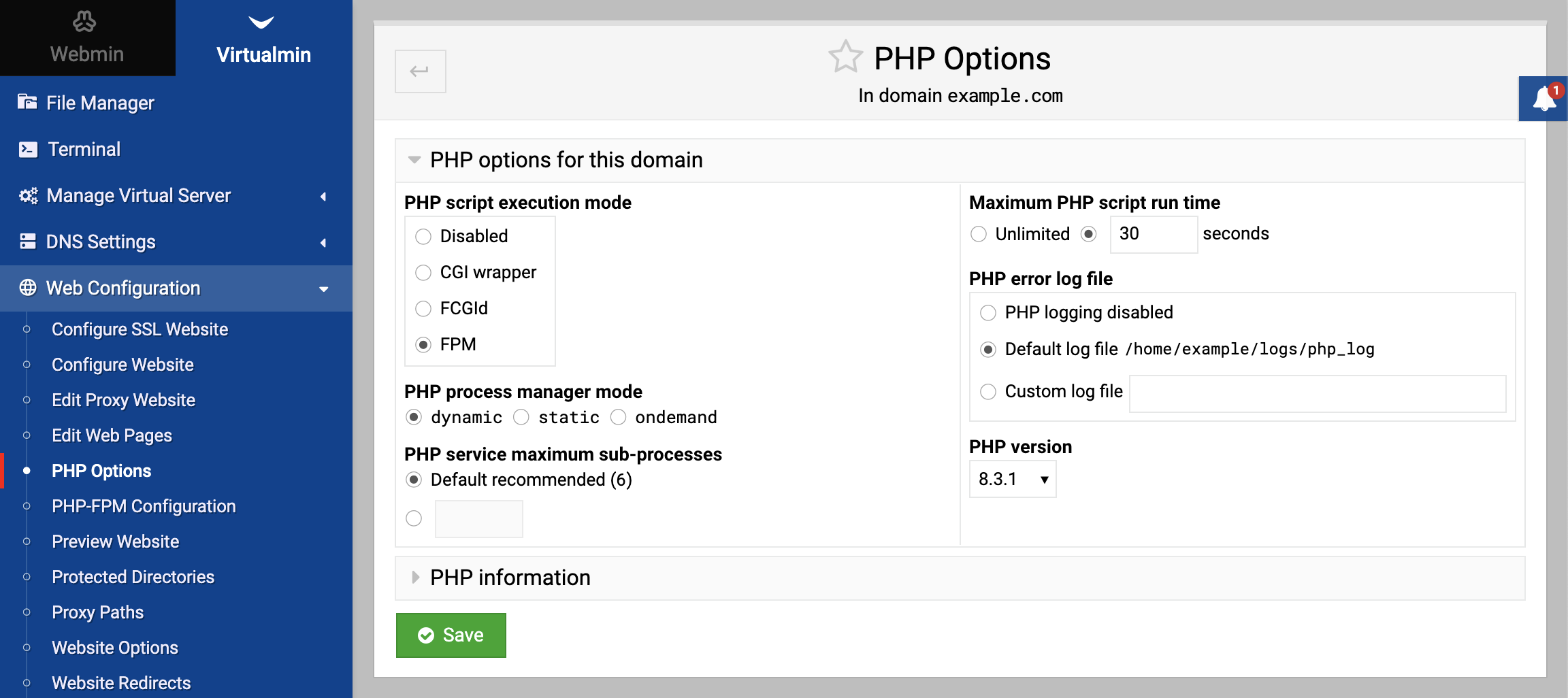
Set default PHP version: Configure the default version for new virtual servers in System Settings ⇾ Server Templates ⇾ PHP Options page. For specific virtual server, set the PHP version in Web Configuration ⇾ PHP Options page.
Source: https://www.virtualmin.com/docs/server-components/configuring-multiple-php-versions/
